Parent Guides
Healthy Eating Apps for Kids: Using Parent Reports
Use Snack Spinner parent reports to plan simple food conversations, notice curiosity, and keep app progress separate from pressure to eat or finish a plate.
Updated 2026-09-24 · 3 min read
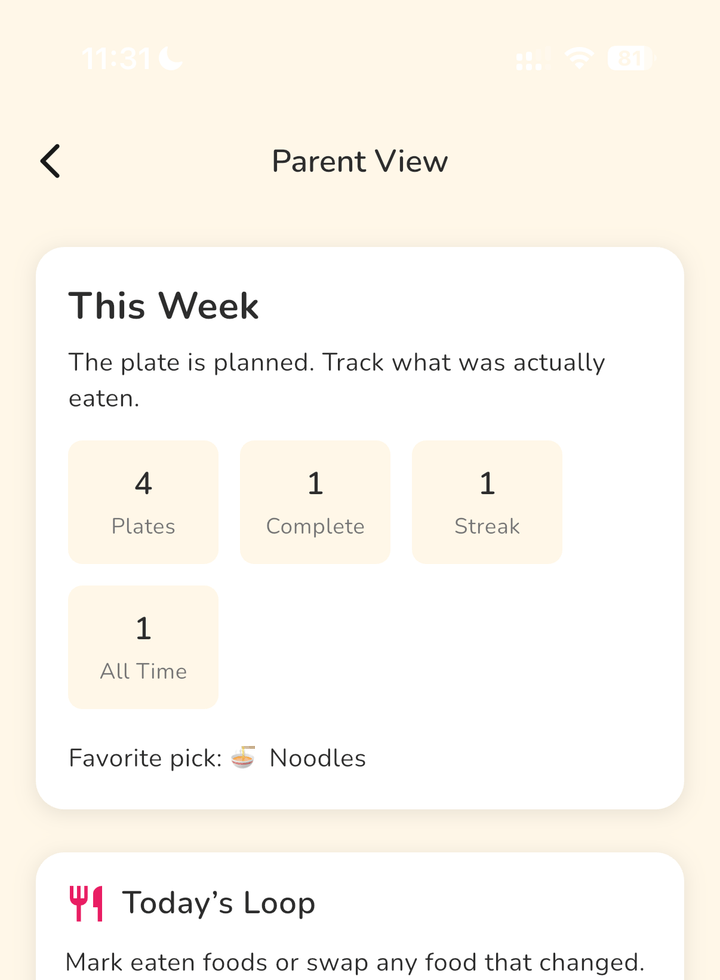
Use the report to choose a next activity
A healthy eating app's parent report can give you a starting point for your next food conversation. In Snack Spinner, look at planned foods, eaten foods, recent plates, and grocery ideas, then choose one food to explore together.
For example, if peas appear on a recent plate, invite your toddler to draw them or name their shape. The activity does not need to end with a bite.
Read food entries in context
A planned food tells you what was planned; it does not establish what your child ate. An eaten-food entry also cannot tell you whether your toddler will want that food tomorrow.
Treat the report as a reminder of your family's app activity. Trophies and visible progress are game features, not a nutritional assessment or proof that picky eating has changed.
Notice curiosity without adding another chore
If you want to remember a small moment, write a short note on paper or in your phone. These are optional parent notes outside Snack Spinner, not a claimed app feature.
- Named a food: Pointed to the banana and said its name.
- Asked a question: Wanted to know what was inside a pea pod.
- Helped prepare: Mashed banana with a fork alongside me.
- Chose to stop: Looked at the picture, then moved on.
Let exploration stay separate from eating goals
The American Academy of Pediatrics describes looking at, touching, smelling, and helping prepare foods as learning opportunities without pressure to eat. Its guidance was updated September 11, 2026, and checked for this article on September 24, 2026. [Read the AAP's food-exploration guidance](https://www.healthychildren.org/English/healthy-living/nutrition/Pages/taste-touch-explore-make-nutritious-food-fun-for-young-eaters.aspx).
For your next activity, use a report or grocery idea to pick something you already have. Offer one invitation, such as naming the food together, and let your child decide whether to join; the guidance does not establish that an app improves eating outcomes.
Decide whether Snack Spinner fits your family
Snack Spinner helps toddlers explore fruits, vegetables, proteins, and grains with Bear, bright wheels, food spins, and tiny lessons. Treats, trophies, parent reports, grocery ideas, and visible progress support the shared game experience.
It may suit families who enjoy a food game together and want ideas to revisit afterward. It is available for iPhone, iPad, and Android, with no ads, no subscription, and parent-gated purchase flows.
If that fits your routine, try Snack Spinner from the [App Store](https://apps.apple.com/us/app/yum-yum-go/id6744628294) or [Google Play](https://play.google.com/store/apps/details?id=com.manan.yumyumgo).
FAQ
What do Snack Spinner parent reports show?
Parent reports show planned foods, eaten foods, recent plates, and grocery ideas. Use them to revisit foods and plan conversations, without treating app activity as a complete picture of your child's diet.
Do I need to record every bite when using a healthy eating app?
For the food-exploration routine described here, no. Choose one food to talk about or explore together, and keep any notes optional. Your child does not need to taste a food or finish a plate to take part.
Download Snack Spinner
Spin, choose, learn, and build a healthy food routine with Bear on iPhone, iPad, and Android.